
Multi-Dimensional Pivot Table Documentation
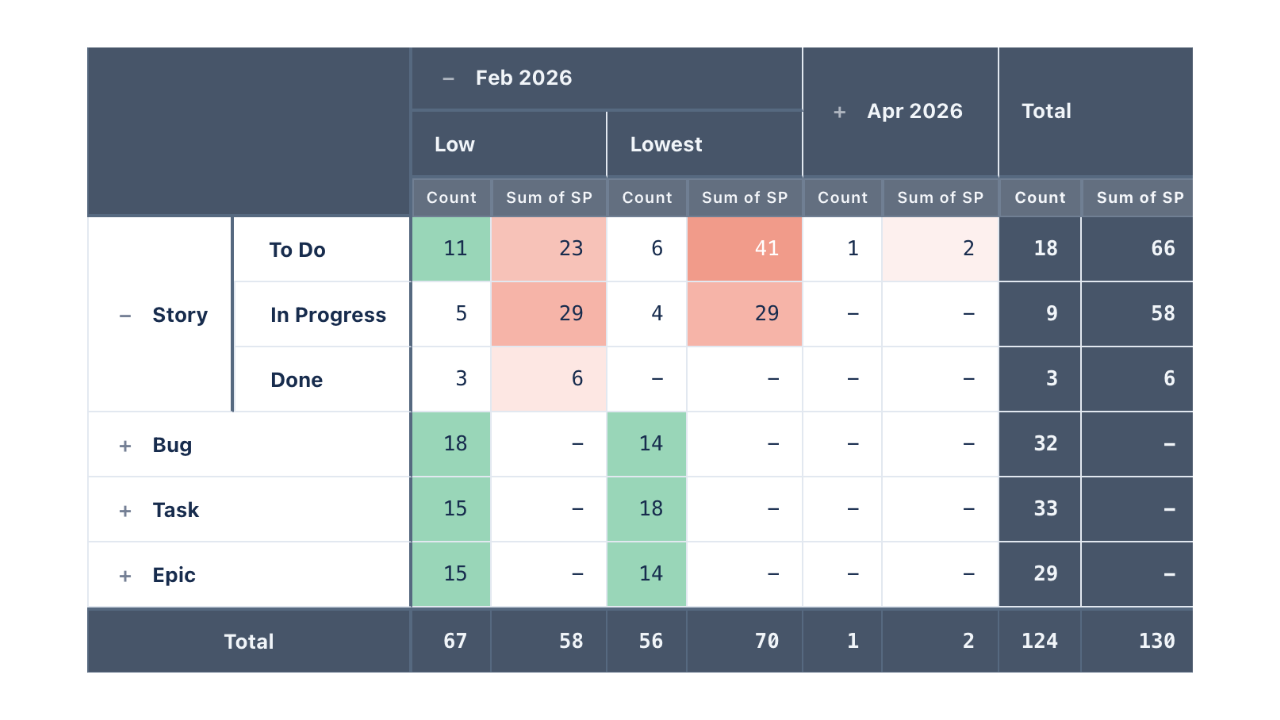
Multi-Dimensional Pivot Table for Jira Dashboards turns any JQL result set into a cross-tab report on a Jira dashboard. Drag fields into Rows and Columns to build nesting of any depth, define one or more Measures — count, sum, average, min, max, conditional variants that compare one field to another, and arithmetic formulas — and the gadget renders an expandable grid with totals, frozen headers, per-measure cell colouring, click-through to the issues behind any cell, and three Excel export layouts.
Everything is computed in the browser from a single JQL search, so the table is exact: an Average total is the true average, not an average of averages.
Data & permissions. Issues are read with the Jira REST API in the context of the person viewing the dashboard — everyone sees only what their own permissions allow. Nothing is written to Jira, nothing leaves your site, and exports are generated in the browser.
Getting Started
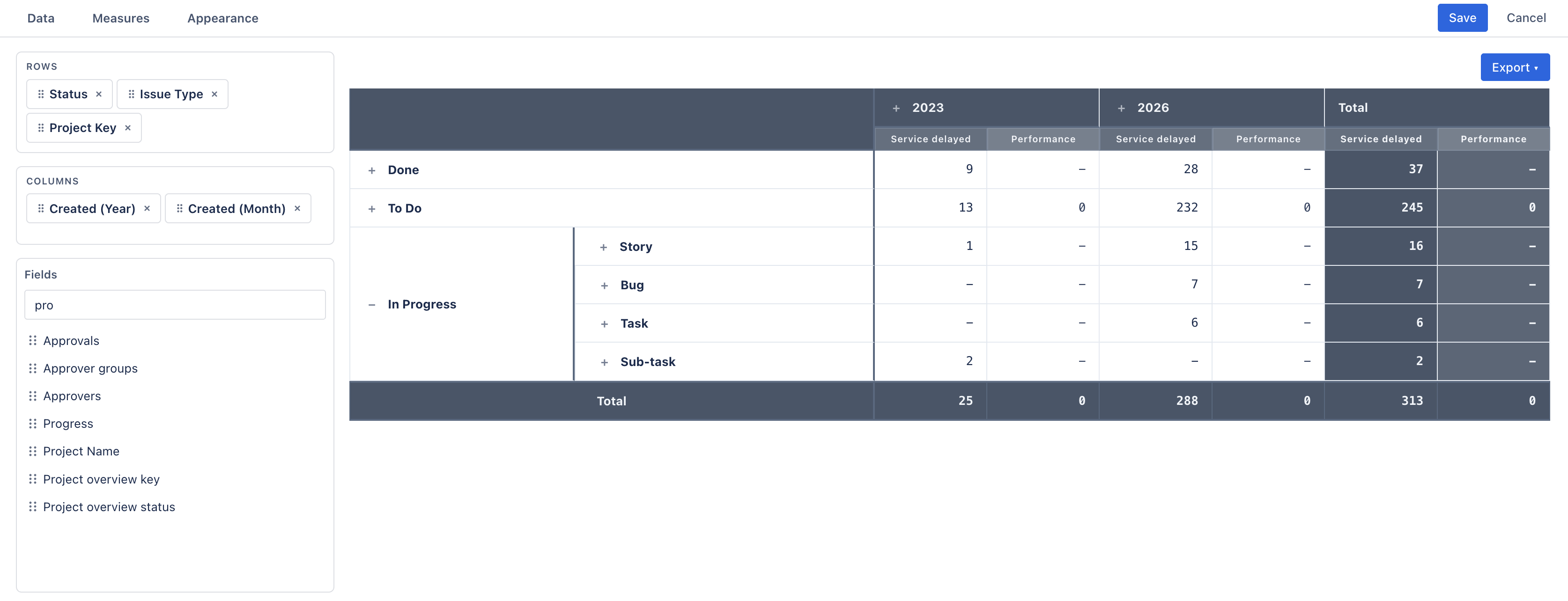
- 1 On a Jira dashboard, Add gadget → Multi-Dimensional Pivot Table, then ··· → Configure.
- 2 In Data, pick a project (or All Projects) and, optionally, a JQL filter.
- 3 Drag fields from the Fields list into Rows and Columns — or use each field's Row / Col buttons.
- 4 Open Measures to add sums, averages, conditions or formulas beside the default issue count.
- 5 Check the live preview, then Save.
A new gadget starts with a sensible layout — rows Status › Issue Type, column Priority, measure Count of Issues, totals and frozen headers on — so there is something to look at immediately.
Data
| Setting | Meaning |
|---|---|
| Project | One project from the site's most recently active ones, or All Projects. New gadgets pre-select your most active project. |
| Filter (optional) | Any JQL, in Atlassian's own JQL editor with autocomplete.
Combined with the project as project = "KEY" AND (…); an ORDER
BY is kept at the end. To use a saved filter, write filter = "My
filter". |
The gadget fetches only the fields it needs for the current layout and measures, one thousand issues per request, up to 10,000 issues. Querying All Projects without a filter is allowed but the editor warns that it may be slow on large sites — narrow it.
Data is loaded when the gadget appears on the dashboard; the editor preview refreshes about a second after your last change.
Rows & Columns
Each field in a zone is one nesting level; order top-to-bottom is outer-to-inner. Drag chips to reorder within a zone or move between zones. A field can be used once across both zones. Columns are optional — with none, the table is a grouped summary with one value column per measure.
Available fields
The Fields palette (searchable) lists your site's fields, with a few expanded into the variants people actually pivot on:
- Project Name and Project Key.
- Issue Type, Status, Priority, Resolution — by name.
- Assignee, Reporter, Creator — by display name.
- Every date field as four bucketed variants — (Year), (Month), (Week), (Day).
- Cascading selects as the parent field and a separate (Child) variant.
- Labels, components, versions, sprint, and custom fields as-is.
Empty values group as Unassigned. Multi-value fields (labels, components) group by their combined value — an issue labelled a, b is one row, not two.
Date bucketing
Bucketed date variants label their groups as 2026, Jan 2026,
W03 2026 (ISO week) or 15 Jan 2026, and sort chronologically. That is
how a "resolved per month × priority" table is built: rows Resolved (Month), columns
Priority.
Text and category dimensions sort alphabetically on the column axis and in order of first appearance on the row axis.
Measures
Open the Measures panel and click Measures to manage the list. Every measure becomes one value column under each leaf column (and under the Total column). Reorder them by dragging; the eye icon hides a measure from the table while keeping it available to formulas.
Calculations
| Setting | Meaning |
|---|---|
| Label | The column header. Must be unique; renaming rewrites every formula that references it. |
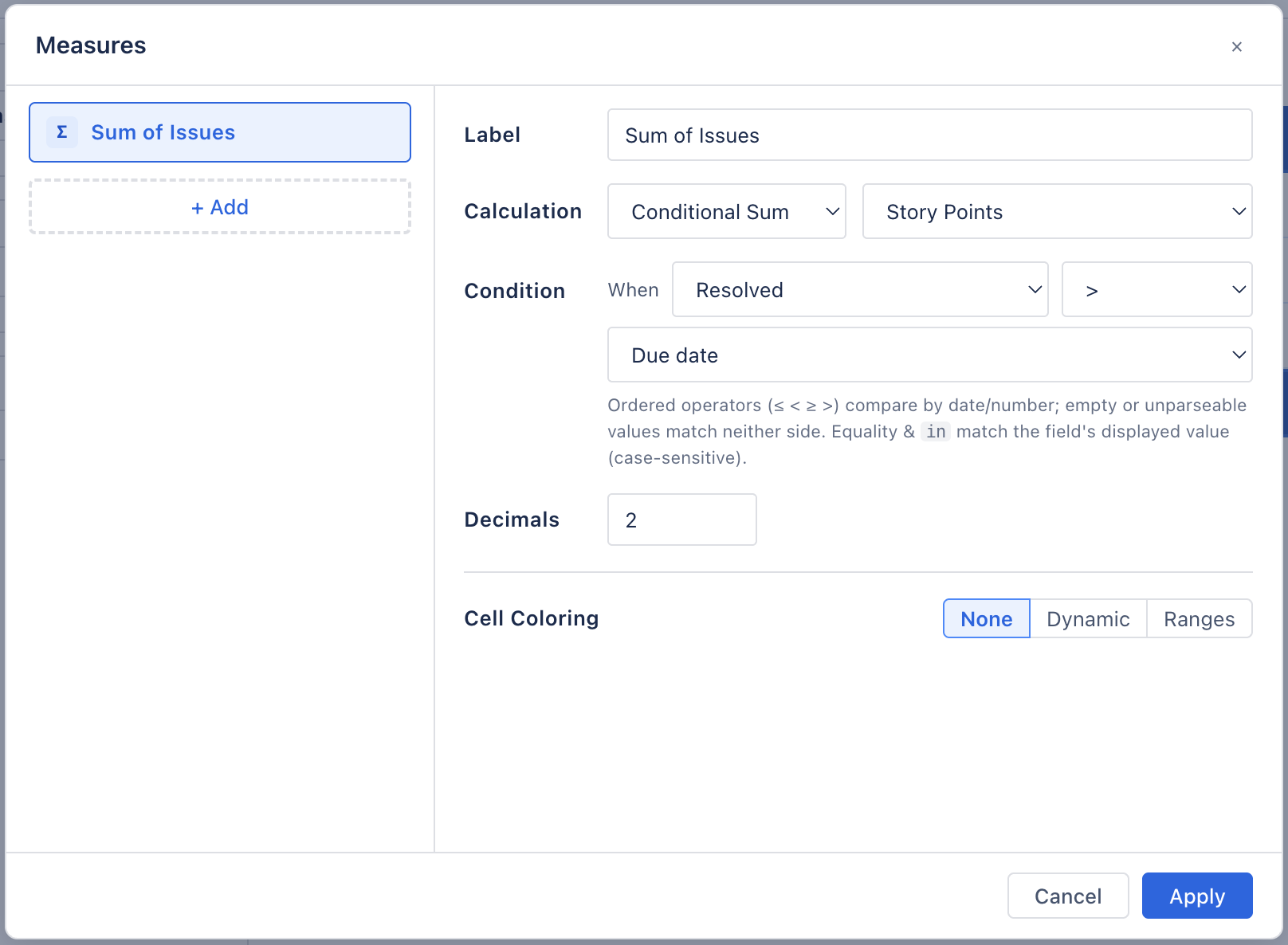
| Calculation | Count · Conditional Count · Sum · Conditional Sum · Average · Min · Max. |
| Field | For everything but Count: any numeric field — Story Points, estimates, time spent, scores, custom numbers. Non-numeric or empty values are ignored, not counted as zero. |
| Decimals | 0–6 per measure (default 2). Numbers use your browser's locale separators; trailing zeros are dropped. |
Conditional measures
Conditional Count and Conditional Sum only count issues that satisfy a condition — and the condition can compare a field to a literal or to another field of the same type. That is the part JQL cannot do on its own:
- When Resolved > Due date → late deliveries per team.
- When Time Spent > Original Estimate → over-budget work per epic.
- When Priority in (Highest, High) → the urgent share of each row.
Operators follow the field type: ordered comparisons (≤ < ≥ >) for dates and numbers, equality and in / not in for anything, contains for text. Empty or unparseable values on either side match neither.
Formulas
A Formula measure combines other measures with + - * / ( ),
referencing them by label in braces: {Late} / {Count} * 100. Click a label pill to
insert it. Formulas evaluate per cell — including subtotal and total cells — so a percentage
is right at every level. Hide the operands with the eye icon and only the ratio shows.
Division by zero or a missing operand renders as -, never as a wrong number; a
reference to a deleted measure shows a ⚠ marker.
Cell colouring
Each measure has its own Cell Coloring:
| Mode | Behaviour |
|---|---|
| None | Default. |
| Dynamic | A single-hue heat map: pick a base colour and cells shade from faint to solid between the smallest and largest value of that measure across the visible table. Text flips to white on dark cells. |
| Ranges | Explicit bands — Min, Max, colour — added with + Add Range. Blank Min or Max means open-ended; the first matching range wins. |
Reading the Table
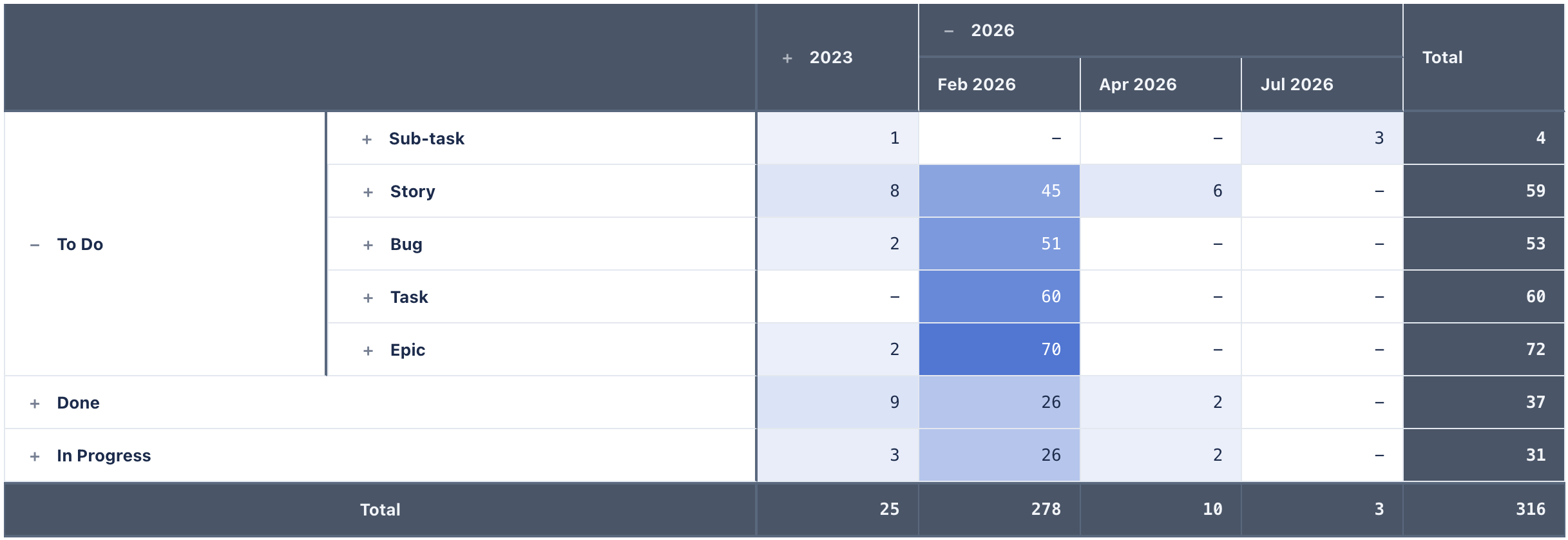
- By default the table opens collapsed to the first row and column level.
+/−on any header expands or collapses that group; a collapsed parent shows its own aggregate — it is the subtotal. The Collapsible Groups setting (see Appearance) can switch either axis to a flat layout with every level open. - Total column (row totals) and a Total footer row (column totals) can be toggled independently.
- Headers freeze while you scroll a large table, both the column headers at the top and the row-dimension columns on the left.
- Hovering a cell highlights its column and its row's whole ancestry.
- Empty intersections show
-.
Drill-down
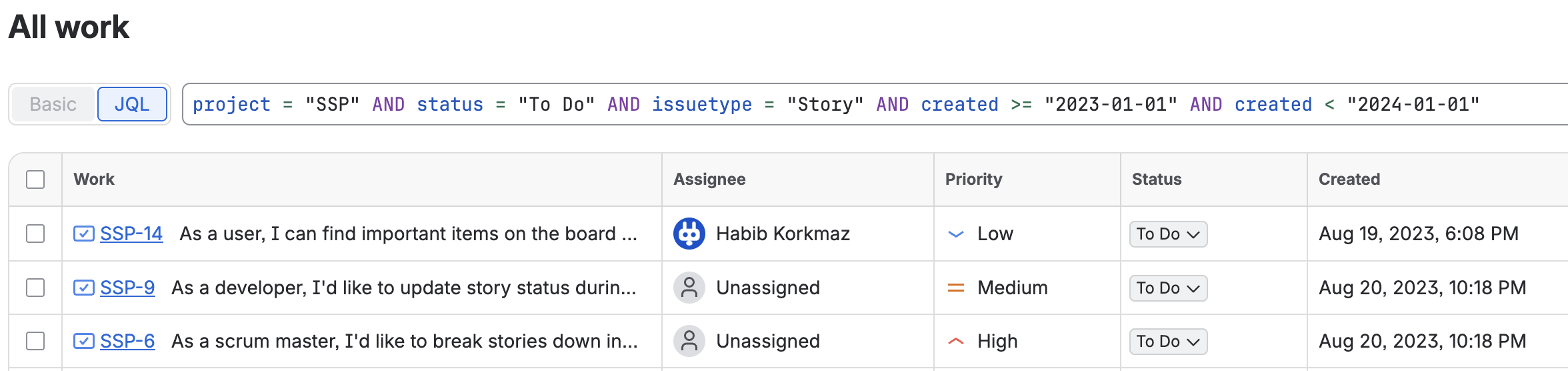
Every value cell is a link. Clicking one opens the Jira issue navigator in a new tab with the JQL
for exactly that cell — the data-source query plus one clause per row level and one per column
level (date buckets become date ranges, Unassigned becomes is EMPTY).
Total cells drill to their slice; the grand total drills to the whole scope.
Appearance
| Setting | Meaning |
|---|---|
| Theme | Slate · Cobalt · Dark · Violet · Forest. Each has a light and a dark variant; the gadget follows Jira's colour mode automatically. |
| Collapsible Groups | Rows and Columns,
independently. On (the default) that axis is a drill-down: groups start collapsed and
open with + / −. Off, the axis renders flat — every level
open at once, no buttons — a standard grouped table. |
| Show Totals | Rows (Total column) and Columns (Total row), independently. |
| Freeze Headers | Rows (sticky column headers) and Columns (sticky row-dimension columns). |
| Headers | Row header titles shows each row dimension's field name in the top-left corner, above its column (off by default, the corner is blank). Column header title adds a thin strip above the column headers naming the column dimension (e.g. STATUS; nested dimensions read STATUS › PRIORITY). Wrap text lets long labels in column headers and row dimensions break onto multiple lines instead of being truncated with an ellipsis. Column widths stay fixed; rows grow taller as needed. |
Excel Export
The Export ▾ button on the gadget writes an .xlsx file in the
browser — no server involved. Three layouts, because different people open the file for
different reasons:
| Layout | What you get |
|---|---|
| Normalized | One row per combination of row and column values, one column per measure — the shape Excel PivotTables and BI tools want. |
| Drilldown | The full hierarchy with native Excel + /
− outline groups on rows and columns, subtotals and grand totals. |
| Report | Merged multi-level headers and merged row cells — the print-ready version. |
Exports respect hidden measures and the totals toggles, and always include the whole hierarchy regardless of what is expanded on screen. Cell colours are not carried over.
Troubleshooting
"Configure the data source in the gadget settings to get started."
The gadget has no saved configuration yet — open Configure and save once.
"No issues found for this scope."
The effective JQL returned nothing — or Jira rejected it. Paste the same JQL into the issue navigator: an invalid query or a project you cannot see both end up here.
Numbers look lower than expected on a very large scope
The gadget reads up to 10,000 issues. Narrow the project or filter — a pivot over more than that is rarely readable anyway.
A drill-down opens an empty issue list
Multi-value fields (labels, components) group by their combined value, and the generated JQL can't reproduce that combination. Drill from a single-value dimension instead.
Everything is collapsed again after a reload
Expansion is a viewing state, not part of the configuration; every viewer starts from the top level. If a table should always show every level, turn off Collapsible Groups for that axis in the Appearance tab instead.
Data isn't refreshing
The gadget queries Jira when it loads. Reload the dashboard for fresh numbers.
Support
Questions, feedback or a feature request? We answer fast.
Email: [email protected]