
Sprint Health & Capacity Tracker Documentation
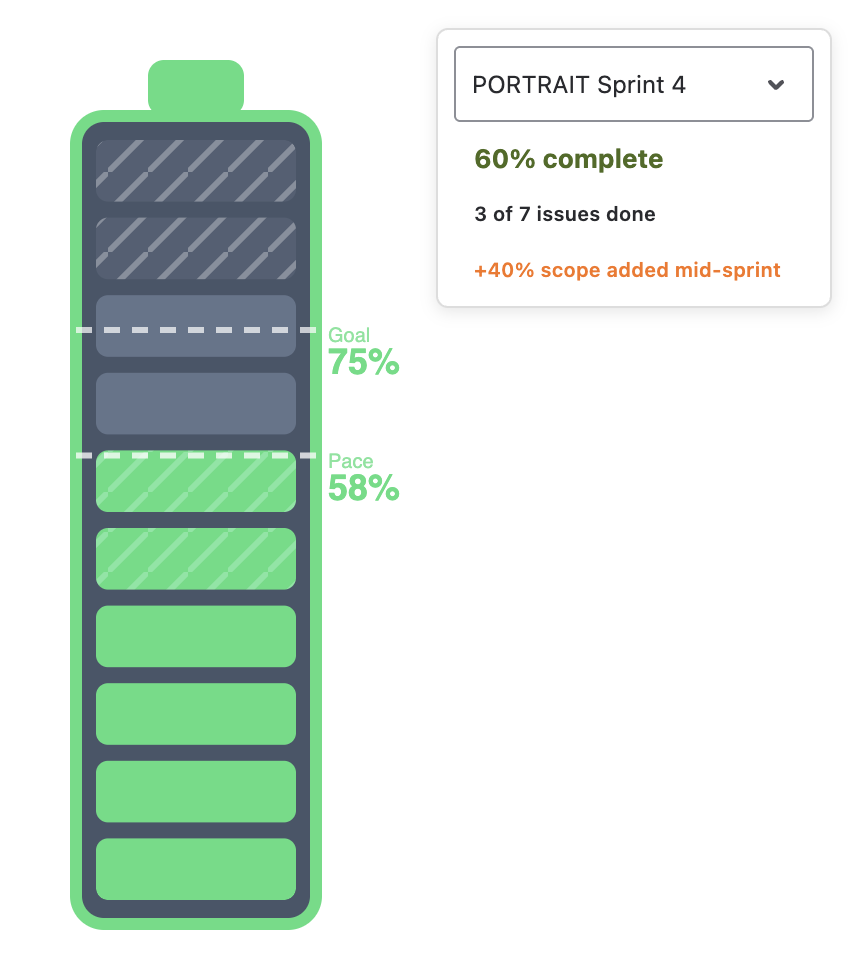
Sprint Health & Capacity Tracker for Jira Dashboards shows a sprint as a battery. The charge is how much of the originally planned work is done — by issue count or by story points — the border colour says whether the team is on pace, a dashed Goal line marks the target completion and a dashed Pace line marks how much of the sprint's time has elapsed. Work added after the sprint started is drawn as hatched segments, so scope creep is visible rather than silently diluting the percentage. Every segment is clickable and opens the matching issues in Jira.
Two layouts: Single — one board's sprint, with optional breakdown batteries by assignee, type, priority or epic — and Comparison — up to four batteries side by side, each its own board and sprint, for a team-of-teams or a last-four-sprints view.
Data & permissions. Sprints and issues are read with the Jira REST API in the context of the person viewing the dashboard — everyone sees only what their permissions allow. Nothing is written to Jira and nothing leaves your site.
Getting Started
- 1 On a Jira dashboard, Add gadget → Sprint Health & Capacity Tracker, then ··· → Configure.
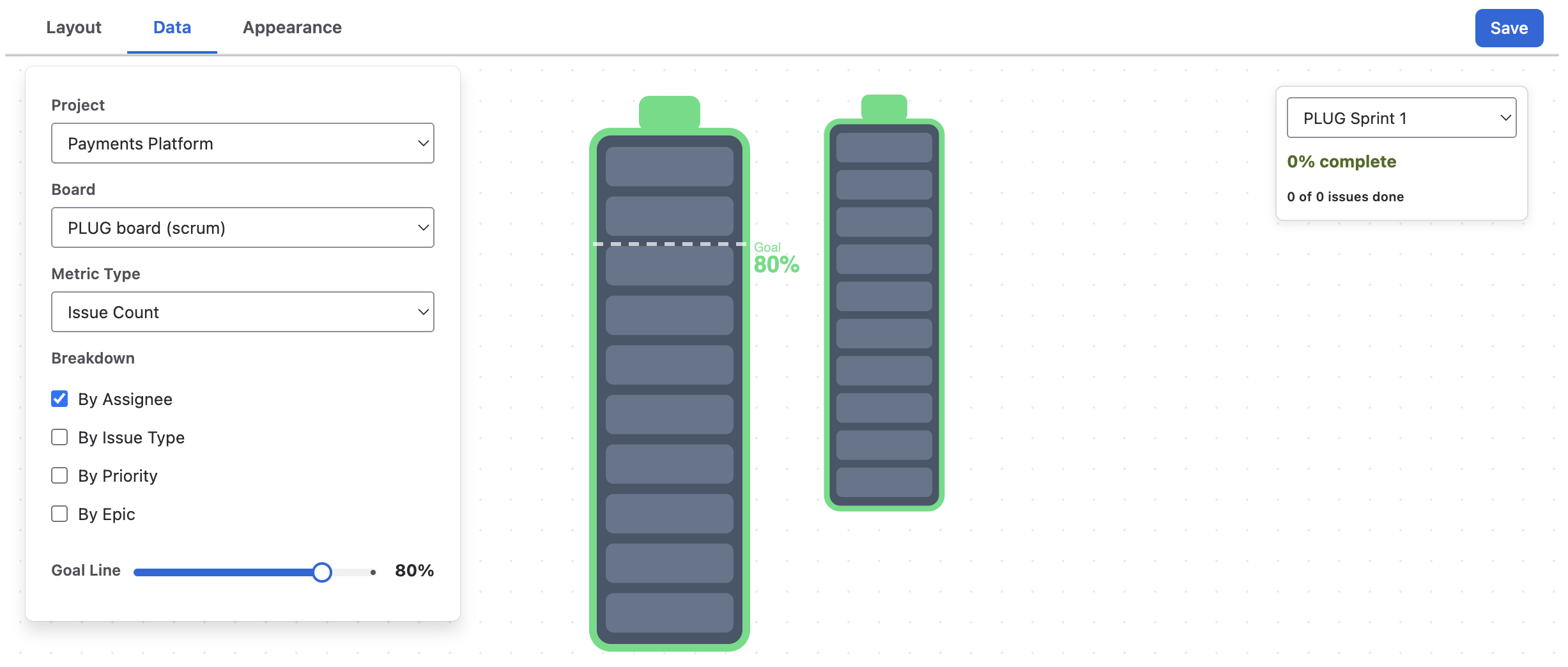
- 2 In Data, pick a Project and a Scrum Board. The active sprint is selected automatically.
- 3 Choose the Metric Type — Issue Count or Sum of Field (Story Points) — and set the Goal Line.
- 4 Tick the Breakdowns you want under the main battery, pick an orientation in Appearance, and Save.
Reading the Battery
Fill, goal & pace
- Fill = done ÷ originally planned, in the chosen metric. "Done" is Jira's Done status category. The battery has ten segments, so the drawing rounds to the nearest 10 %; the exact percentage is in the stats block beside it.
- Goal — the dashed line at your target completion (default 80 %). For a closed sprint it is the pass/fail bar.
- Pace — the dashed line at the fraction of the sprint's calendar time that has elapsed. If the fill is above the pace line, the team is ahead; below, behind.
- Overcharge — delivering added work on top of the plan can push completion past 100 %. The battery glows and the stats show +N % over capacity.
The stats block reads 62 % complete · 13 of 21 issues done (or pts), adds +14 % scope added mid-sprint when applicable, and shows N days left! when the sprint is critically behind.
Scope added mid-sprint
An issue counts as added scope if it was created after the sprint started or moved into the sprint after it started (read from the issue's change history). Added work is excluded from the planned capacity and drawn as hatched segments — in the state colour when done, in grey and packed at the far end when still open — so the main percentage keeps answering "how much of what we committed is finished". The sprint's real start time (the moment someone clicked Start sprint) is used, with a one-minute grace period, so issues dragged in during planning don't count as creep.
Green, yellow, red
| State | When |
|---|---|
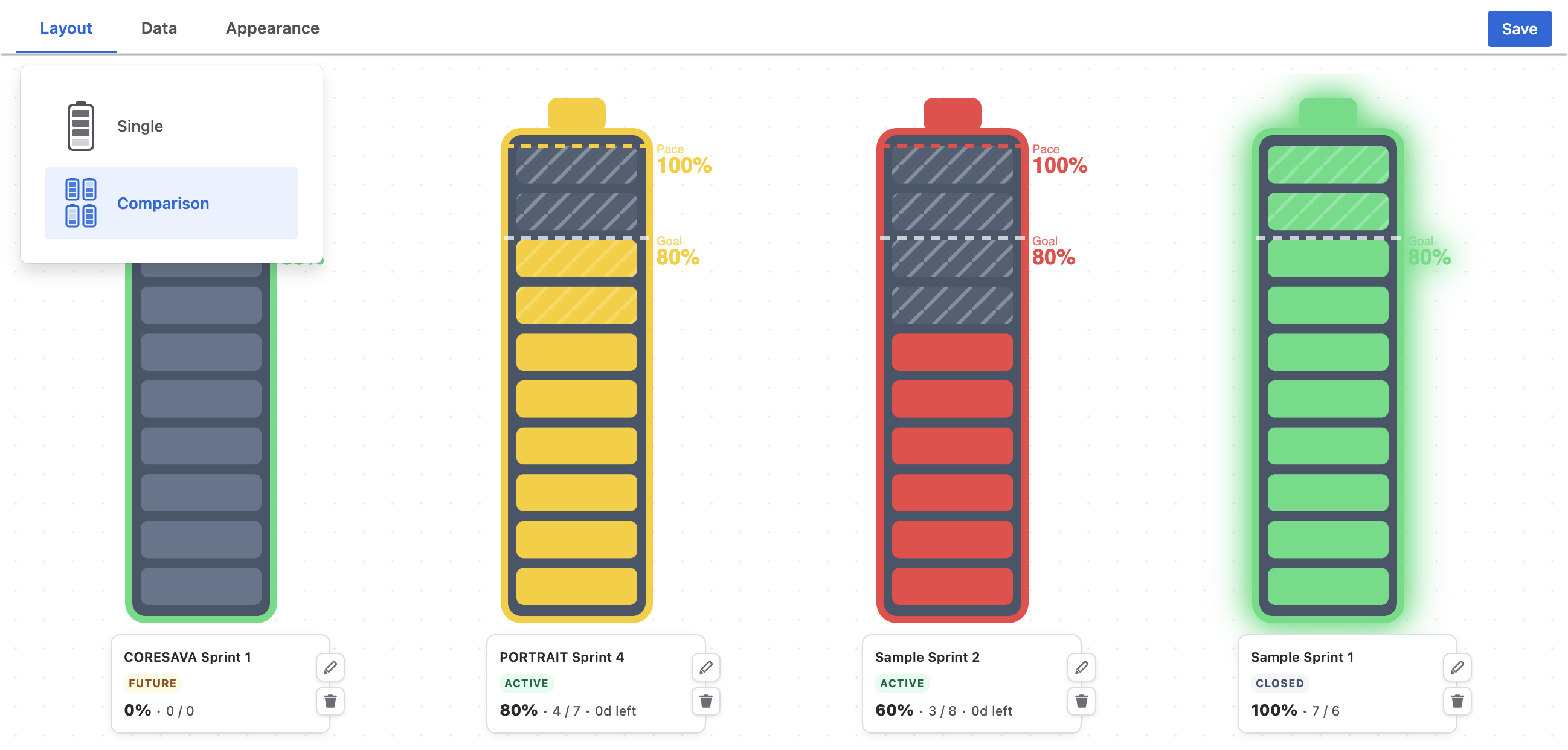
| Green | Fill is at or near the pace line, or the sprint hasn't started, or the sprint is closed and reached the goal. |
| Yellow | Fill is more than ten points behind the pace line. |
| Red | The sprint is more than half over and fill is below 70 % of elapsed time — or the sprint is closed and missed the goal. |
Pace is calendar time; weekends count. Expect a dip in the middle of a two-week sprint.
Single Layout
Data settings
| Setting | Meaning |
|---|---|
| Project | The project whose boards to list. |
| Board | A Scrum board of that project. Kanban boards are listed but have no sprints. |
| Sprint | Not a saved setting: the gadget always opens on the board's active sprint (or the latest one when none is active), and a dropdown on the gadget lets any viewer flip to a past or future sprint for the current session. |
| Metric Type | Issue Count or Sum of Field with a Numeric Field — Story Points first in the list, any numeric field allowed. |
| Goal Line | 0–100 % in steps of 5; default 80. |
| Breakdown | Any of By Assignee, By Issue Type, By Priority, By Epic. |
Breakdowns
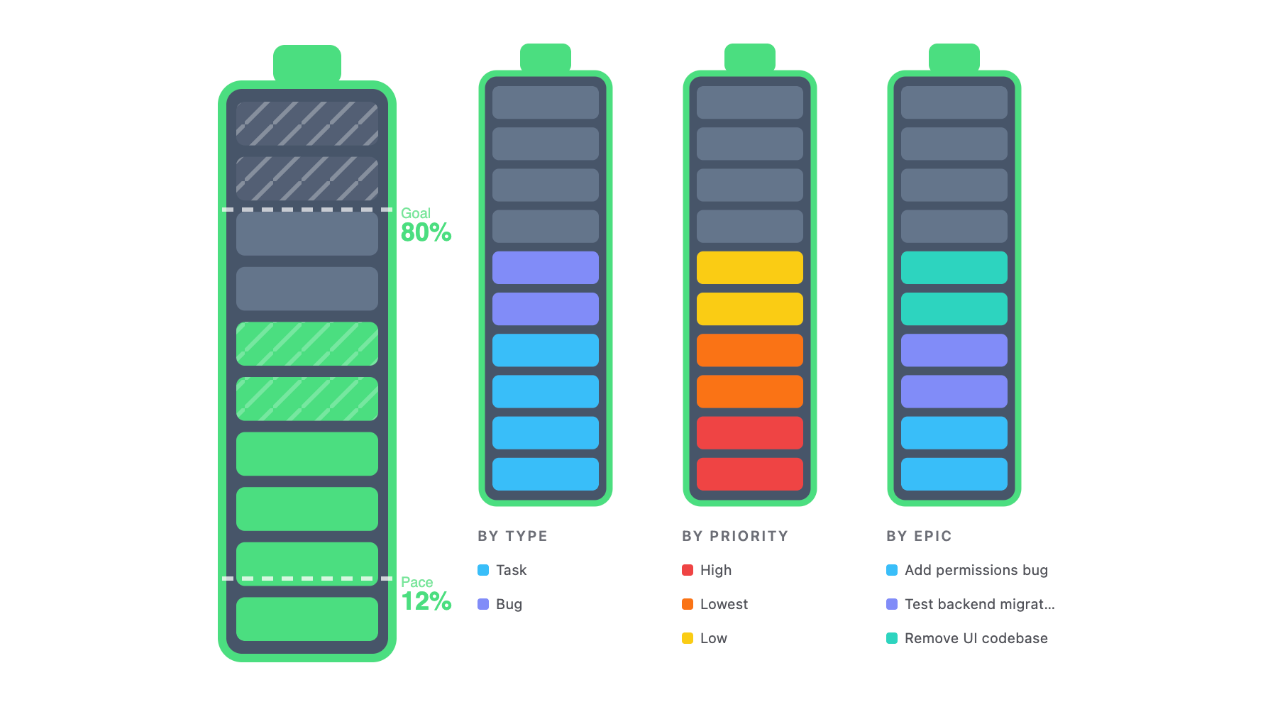
Each breakdown adds a smaller battery whose segments show the composition of the completed work — who delivered how much, which types, which priorities, which epics — with a legend. Click a colour band to open those issues. Breakdown batteries don't draw goal or pace lines; they answer a different question. The overview picture above shows three of them beside the main battery.
Comparison Layout
Switch to Comparison in Layout and configure up to four battery slots. Each slot has its own Project, Board, Metric and Goal Line, and a Sprint chosen relatively — Current sprint, Previous sprint, 2 sprints ago … 5 sprints ago — so the gadget rolls forward on its own when a new sprint starts. Two ways to use it:
- Four teams, current sprint — four boards, all on Current sprint.
- One team, last four sprints — one board, Current / Previous / 2 ago / 3 ago, for a velocity-at-a-glance read.
Under each battery: the sprint name, an Active / Closed / Future badge, and a compact 62 % · 13 / 21 · 4d left line. Hover a slot in the editor to edit or remove it.
Appearance
| Setting | Meaning |
|---|---|
| Orientation | Vertical (fills bottom → top) or Horizontal (left → right, lower gadget). |
| Show Goal Line | Toggle the dashed goal marker. |
| Show Pace Line | Toggle the dashed pace marker. |
The battery body and empty segments follow Jira's light and dark mode.
Troubleshooting
"Open gadget settings to choose a board."
No board is saved yet — open Configure, pick a project and a board, Save.
"No sprints found for this board."
The board is a Kanban board, or a Scrum board with no sprints. Pick a Scrum board that has at least one sprint.
The battery is red although we're on track
Pace is calendar time. Mid-sprint, after a weekend, the pace line jumps ahead; if the fill is below 70 % of it and the sprint is past halfway, the state is red. It recovers as work closes.
The percentage and the segments disagree
The battery draws ten segments and rounds to the nearest 10 %; the text is exact.
Story points show "pts" but we sum a different field
The unit label is fixed; the numbers are your field's.
The sprint I picked in the dropdown didn't stick
The dropdown is a viewing aid; the gadget always reopens on the active (or latest) sprint. To pin a past sprint permanently, use the Comparison layout with a relative offset.
Data isn't refreshing
The gadget queries Jira when it loads. Reload the dashboard for fresh numbers.
Support
Questions, feedback or a feature request? We answer fast.
Email: [email protected]